Homepage Dashboard
Status: Deployed ✅ Date: 2026-04-11 URL: dash.exzentcg.com
What is Homepage?
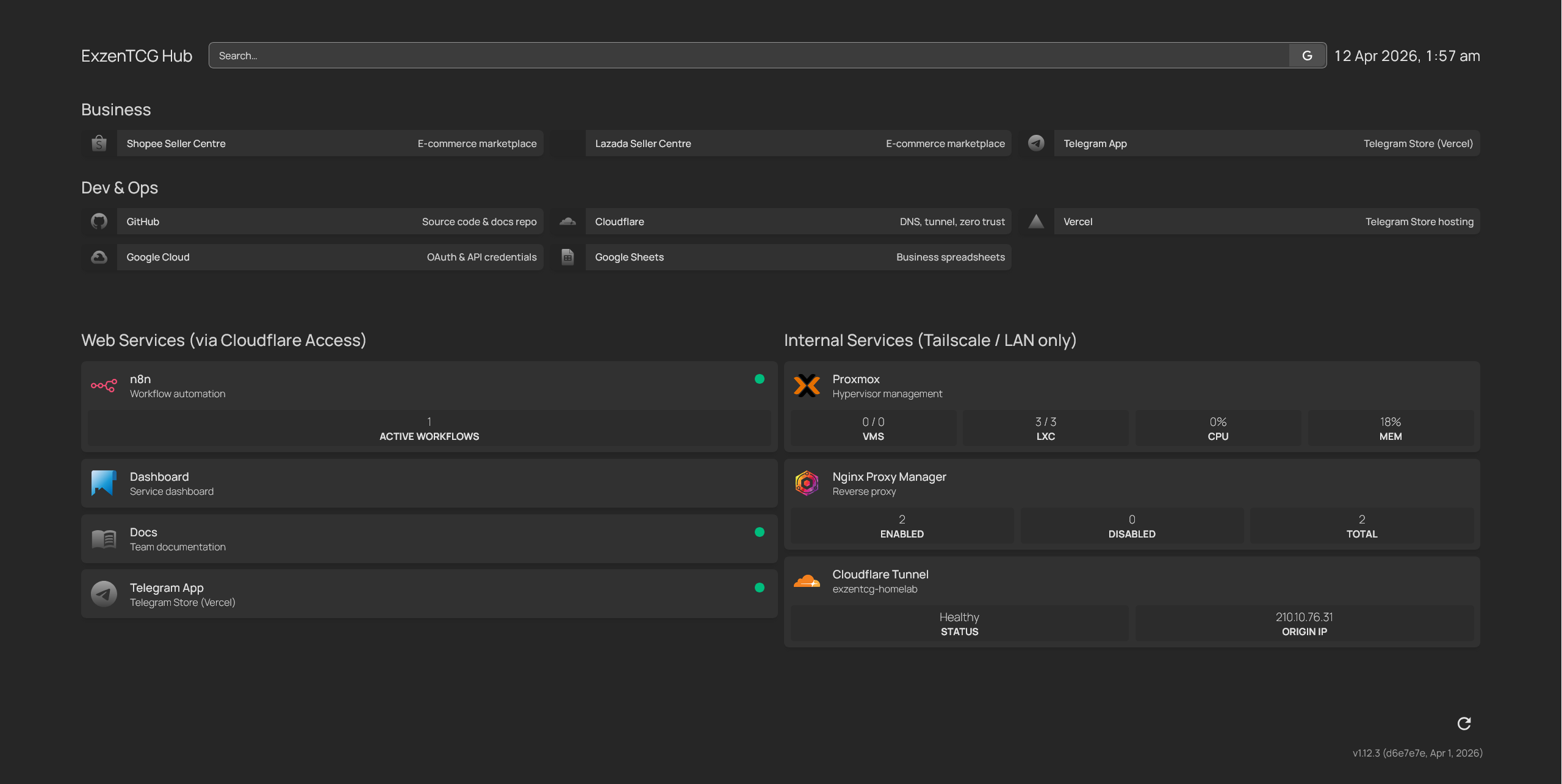 Homepage is a lightweight, self-hosted dashboard that shows all ExzenTCG services at a glance. It has no built-in authentication — access is gated behind Cloudflare Access.
Why we need it: Gives the team a single page to see every service, its URL, and its status. No more bookmarking individual URLs or asking "what's the link for n8n?"
Deployment Details
| Property | Value |
|---|---|
| CT ID | 103 |
| Hostname | homepage |
| IP | 192.168.0.53 |
| Port | 3000 |
| Docker image | ghcr.io/gethomepage/homepage:latest |
| RAM | 256 MB |
| Swap | 256 MB |
| Disk | 4 GB |
| DNS | 1.1.1.1 (set via pct set 103 --nameserver 1.1.1.1) |
| Public URL | https://dash.exzentcg.com |
| Auth | Cloudflare Access (owner-only, 7-day session) |
| Snapshot | initial-deploy |
Deployment Log
Step 1 — Create LXC
pct create 103 local:vztmpl/debian-12-standard_12.12-1_amd64.tar.zst \
  --hostname homepage \
  --cores 1 \
  --memory 256 \
  --swap 256 \
  --rootfs local-lvm:4 \
  --net0 name=eth0,bridge=vmbr0,ip=192.168.0.53/24,gw=192.168.0.1 \
  --nameserver 192.168.0.1 \
  --features nesting=1 \
  --onboot 1 \
  --start 1
Step 2 — Install Docker + Deploy
apt update && apt upgrade -y && apt install curl -y
curl -fsSL https://get.docker.com | sh
# Docker 29.4.0 installed
mkdir -p /opt/homepage/config && cd /opt/homepage
Docker Compose (/opt/homepage/docker-compose.yml):
services:
  homepage:
    image: ghcr.io/gethomepage/homepage:latest
    container_name: homepage
    restart: unless-stopped
    ports:
      - "192.168.0.53:3000:3000"
    volumes:
      - ./config:/app/config
    environment:
      - HOMEPAGE_ALLOWED_HOSTS=dash.exzentcg.com,192.168.0.53:3000
Note
First docker compose up failed — ghcr.io DNS lookup failed on router DNS (192.168.0.1). Fixed with pct set 103 --nameserver 1.1.1.1 from the Proxmox host, then rebooted the container.
Step 3 — Configuration
/opt/homepage/config/services.yaml (segregated by access method):
- "Web Services (via Cloudflare Access)":
    - n8n:
        icon: n8n.png
        href: https://n8n.exzentcg.com
        description: Workflow automation
        siteMonitor: http://192.168.0.52:5678
        widget:
          type: customapi
          url: http://192.168.0.52:5678/api/v1/workflows?limit=100&active=true
          headers:
            X-N8N-API-KEY: "{{HOMEPAGE_VAR_N8N_KEY}}"
          refreshInterval: 30000
          mappings:
            - field:
                data: length
              label: Active Workflows
              format: number
    - Dashboard:
        icon: homepage.png
        href: https://dash.exzentcg.com
        description: Service dashboard
    - Docs:
        icon: mdi-book-open-variant
        href: https://docs.exzentcg.com
        description: Team documentation
        ping: https://docs.exzentcg.com
    - Telegram App:
        icon: si-telegram
        href: https://telegram2.exzentcg.com
        description: Telegram Store (Vercel)
        ping: https://telegram2.exzentcg.com

- "Internal Services (Tailscale / LAN only)":
    - Proxmox:
        icon: proxmox.png
        href: https://192.168.0.200:8006
        description: Hypervisor management
        widget:
          type: proxmox
          url: https://192.168.0.200:8006
          username: root@pam!widget
          password: "{{HOMEPAGE_VAR_PROXMOX_TOKEN}}"
          node: pve
          fields: ["vms", "lxc", "resources.cpu", "resources.mem"]
    - Nginx Proxy Manager:
        icon: nginx-proxy-manager.png
        href: http://192.168.0.51:81
        description: Reverse proxy
        widget:
          type: npm
          url: http://192.168.0.51:81
          username: "{{HOMEPAGE_VAR_NPM_USER}}"
          password: "{{HOMEPAGE_VAR_NPM_PASS}}"
    - Cloudflare Tunnel:
        icon: cloudflare.png
        href: https://dash.cloudflare.com
        description: exzentcg-homelab
        widget:
          type: cloudflared
          accountid: "{{HOMEPAGE_VAR_CF_ACCOUNT}}"
          tunnelid: 72dbcbd0-d7d9-41d4-b55e-87e5eb9b27ad
          key: "{{HOMEPAGE_VAR_CF_TOKEN}}"
    - Home Router:
        icon: mdi-router-wireless
        href: http://192.168.0.1
        description: D-Link admin panel
    - Intel AMT:
        icon: mdi-chip
        href: http://192.168.0.200:16992
        description: Out-of-band management (MeshCommander)
Note
Router and AMT are accessible remotely via Tailscale subnet routing (see Decision D7 in Known Issues & Decisions). The Proxmox host advertises 192.168.0.0/24 as a subnet route.
/opt/homepage/config/bookmarks.yaml:
- Business:
    - Shopee Seller Centre:
        - icon: si-shopee
          href: https://seller.shopee.sg
          description: E-commerce marketplace
    - Lazada Seller Centre:
        - icon: si-lazada
          href: https://sellercenter.lazada.sg
          description: E-commerce marketplace
    - Telegram App:
        - icon: si-telegram
          href: https://telegram2.exzentcg.com
          description: Telegram Store (Vercel)

- Dev & Ops:
    - GitHub:
        - icon: si-github
          href: https://github.com/ExzenTCG
          description: Source code & docs repo
    - Cloudflare:
        - icon: si-cloudflare
          href: https://dash.cloudflare.com
          description: DNS, tunnel, zero trust
    - Vercel:
        - icon: si-vercel
          href: https://vercel.com/dashboard
          description: Telegram Store hosting
    - Google Cloud:
        - icon: si-googlecloud
          href: https://console.cloud.google.com
          description: OAuth & API credentials
    - Google Sheets:
        - icon: si-googlesheets
          href: https://docs.google.com/spreadsheets
          description: Business spreadsheets
/opt/homepage/config/widgets.yaml:
- greeting:
    text_size: xl
    text: ExzenTCG Hub
- search:
    provider: google
    target: _blank
- datetime:
    locale: en-SG
    format:
      dateStyle: medium
      timeStyle: short
/opt/homepage/config/settings.yaml:
title: ExzenTCG Hub
favicon: data:image/x-icon;base64,<base64 encoded favicon.ico>
theme: dark
color: neutral
headerStyle: clean
statusStyle: dot
quicklaunch:
  searchDescriptions: true
layout:
  "Web Services (via Cloudflare Access)":
    style: row
    columns: 4
  "Internal Services (Tailscale / LAN only)":
    style: row
    columns: 3
  Business:
    style: row
    columns: 3
  "Dev & Ops":
    style: row
    columns: 3
/opt/homepage/docker-compose.yml (environment variables for widget API keys):
environment:
  - HOMEPAGE_ALLOWED_HOSTS=dash.exzentcg.com,192.168.0.53:3000
  - HOMEPAGE_VAR_PROXMOX_TOKEN=<Proxmox API token secret>
  - HOMEPAGE_VAR_CF_TOKEN=<Cloudflare API token>
  - HOMEPAGE_VAR_CF_ACCOUNT=<Cloudflare account ID>
  - HOMEPAGE_VAR_NPM_USER=<NPM admin email>
  - HOMEPAGE_VAR_NPM_PASS=<NPM admin password>
  - HOMEPAGE_VAR_N8N_KEY=<n8n API key>
Note
The favicon must be base64-encoded inline because Cloudflare Access blocks unauthenticated requests to the favicon URL. Generated with: FAVICON_B64=$(base64 -w0 /opt/homepage/config/images/favicon.ico) then embedded in settings.yaml.
Note
Widget API credentials are stored as environment variables in docker-compose.yml and referenced in services.yaml via {{HOMEPAGE_VAR_*}} syntax. Never hardcode credentials directly in the YAML config files.
Step 4 — Firewall
CT 103 firewall — /etc/pve/firewall/103.fw:
[OPTIONS]
enable: 1

[RULES]
IN ACCEPT -source +edge_gw -p tcp -dport 3000     # Only edge-gateway can reach Homepage
IN ACCEPT -source +admin_desktop -p tcp -dport 22  # SSH from admin
IN ACCEPT -source +admin_desktop -p tcp -dport 3000 # Direct LAN access for dev
IN DROP                                             # Block all other inbound
OUT ACCEPT -dest +router_gw -p udp -dport 53       # DNS
OUT ACCEPT -dest +router_gw -p tcp -dport 53       # DNS
OUT ACCEPT -p udp -dport 53                         # Public DNS fallback (1.1.1.1)
OUT ACCEPT -dest 192.168.0.200 -p tcp -dport 8006  # Proxmox API for widget
OUT ACCEPT -dest 192.168.0.51 -p tcp -dport 81     # NPM widget API access
OUT ACCEPT -dest 192.168.0.52 -p tcp -dport 5678   # n8n widget API access
OUT DROP -dest +lan_subnet                          # Lateral movement prevention
OUT ACCEPT -p tcp -dport 443                        # HTTPS (icons, API status checks)
Note
firewall=1 must be set on the network interface, not the container: pct set 103 --net0 name=eth0,bridge=vmbr0,ip=192.168.0.53/24,gw=192.168.0.1,firewall=1
Edge-gateway 101.fw — two changes:
- Comment updated from "Proxy to biz-app (Phase 2)" to "Proxy to homepage" on OUT ACCEPT -dest 192.168.0.53
- Added: IN ACCEPT -source 192.168.0.53 -p tcp -dport 81 (Homepage widget access to NPM admin)
n8n-app 102.fw — added: IN ACCEPT -source 192.168.0.53 -p tcp -dport 5678 (Homepage widget access to n8n API)
Proxmox host host.fw — added: IN ACCEPT -source 192.168.0.53 -p tcp -dport 8006 (Homepage widget access to Proxmox API)
Firewall test: curl -s --connect-timeout 3 http://192.168.0.16 → HTTP 000 ✅ (LAN blocked)
Step 5 — NPM Proxy Host
| Field | Value |
|---|---|
| Domain Names | dash.exzentcg.com |
| Scheme | http |
| Forward Hostname / IP | 192.168.0.53 |
| Forward Port | 3000 |
| Block Common Exploits | ✅ |
| Websockets Support | ✅ |
| SSL Certificate | None |
Step 6 — Cloudflare Tunnel Route
Published application route added to exzentcg-homelab tunnel:
| Field | Value |
|---|---|
| Subdomain | dash |
| Domain | exzentcg.com |
| Service | http://localhost:80 |
DNS CNAME auto-created: dash.exzentcg.com → 72dbcbd0-...cfargotunnel.com
Step 7 — Cloudflare Access
| Field | Value |
|---|---|
| Application name | dashboard |
| Subdomain | dash |
| Domain | exzentcg.com |
| Session Duration | 7 days |
| Policy | owner-only (Allow, Emails: exzensg@gmail.com) |
Step 8 — Verification
https://dash.exzentcg.com→ Cloudflare Access login → Homepage dashboard ✅- All service cards visible and clickable ✅
Step 9 — Snapshot
pct snapshot 103 initial-deploy --description "Homepage dashboard initial deployment"
Customisation
Homepage is configured entirely via YAML files in /opt/homepage/config/:
| File | Purpose |
|---|---|
services.yaml |
Service cards (name, icon, URL, description) |
bookmarks.yaml |
Quick-access bookmark links by category |
widgets.yaml |
Top bar widgets (weather, clock, search, etc.) |
settings.yaml |
Theme, layout, background, title |
custom.css |
Full CSS override |
To add a new service card, edit services.yaml on CT 103:
pct enter 103
nano /opt/homepage/config/services.yaml
# Homepage auto-reloads config — no restart needed
Troubleshooting
| Problem | Cause | Fix |
|---|---|---|
| 502 Bad Gateway | Homepage container down | pct enter 103 && cd /opt/homepage && docker compose up -d |
| Icons not loading | Firewall blocking HTTPS outbound | Check OUT ACCEPT -p tcp -dport 443 in 103.fw |
| "Host not allowed" error | HOMEPAGE_ALLOWED_HOSTS missing the domain |
Add domain to env var in docker-compose.yml, restart |
| DNS resolution failed during docker pull | Container using router DNS | pct set 103 --nameserver 1.1.1.1 from Proxmox host |
| Proxmox widget shows dashes | CT 103 can't reach Proxmox API | Check OUT ACCEPT -dest 192.168.0.200 -p tcp -dport 8006 in 103.fw AND IN ACCEPT -source 192.168.0.53 in host.fw |
| Proxmox widget 401 error | Wrong token ID or secret | Verify with: curl -sk -H 'Authorization: PVEAPIToken=root@pam!widget:<secret>' 'https://192.168.0.200:8006/api2/json/version' |
Cloudflare widget t.result is null |
Wrong/expired API token | Rotate token in Cloudflare dashboard, update HOMEPAGE_VAR_CF_TOKEN in docker-compose.yml, docker compose up -d --force-recreate |
| Favicon not loading | Cloudflare Access blocks the request | Must be base64-encoded inline in settings.yaml |